📋 Table of Contents
- 1. What is the FBR Active Taxpayer List (ATL) and Why is it Essential?
- 2. Visual Guide: 3 Instant Ways to Verify ATL Filer Status
- 3. Method 1: Check ATL Status via SMS to 9966 (10-Second Offline Method)
- 4. Method 2: Check ATL Status Online via Official FBR Portal
- 5. Method 3: Verification via FBR Tax Asaan Mobile App
- 6. Massive Financial Penalties of Being an "Inactive" Taxpayer in Pakistan
- 7. The Salaried Trap: Why Salary Tax Deduction Does NOT Make You Active
- 8. How to Restore Inactive Status to Active: Section 182A Surcharge Guide
- 9. FBR ATL Refresh Cycle: When Does the Active List Update?
- 10. Frequently Asked Questions (FAQs)
The Active Taxpayer List (ATL) published by the Federal Board of Revenue (FBR) is the central regulatory register determining whether an individual or business holds legal "Filer" status in Pakistan. In today's economic environment, being an "Inactive" or non-filer carries punitive withholding tax penalties—ranging from double tax on cash withdrawals to massive surcharges on motor vehicles, property purchases, and banking transactions. This authoritative guide details every method to verify your ATL status by CNIC, understand your verification records, and regain active filer status immediately.
1. What is the FBR Active Taxpayer List (ATL) and Why is it Essential?
Under Section 181A and the Tenth Schedule of the Income Tax Ordinance 2001, the FBR maintains an electronic database of taxpayers who have fulfilled their legal obligation of submitting their annual income tax returns within the prescribed statutory deadline (or paid the requisite late-filing surcharge).
The ATL database is directly connected in real time via API integrations to:
- All Commercial Banks & Microfinance Institutions (State Bank of Pakistan 1Link Switch)
- Provincial Excise & Taxation Departments (Vehicle Registrations & Transfers)
- Sub-Registrar & Land Revenue Authorities (Property Registrations)
- Central Depository Company (CDC) & Pakistan Stock Exchange (PSX)
- National Clearing Company of Pakistan Limited (NCCPL)
2. Visual Guide: 3 Instant Ways to Verify ATL Filer Status
The reference infographic below illustrates the 3 verified channels to check your FBR active taxpayer status:
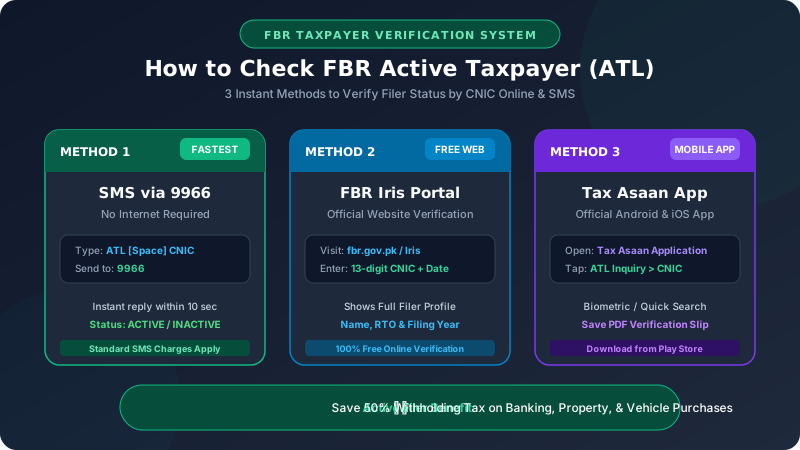
3. Method 1: Check ATL Status via SMS to 9966 (10-Second Offline Method)
The fastest and most convenient method to verify your taxpayer status without requiring an internet connection or smartphone is the FBR 9966 SMS Gateway.
Step-by-Step SMS Instructions for Individuals:
- Open the text messaging app on your mobile phone (works on Jazz, Zong, Telenor, and Ufone).
-
In the message body, type the letters ATL, followed by a single space, followed by your 13-digit CNIC number (without dashes or spaces).
Example Format: ATL 3520112345671 - Send this text message to short code 9966.
- Within 5 to 15 seconds, you will receive an automated reply from FBR containing your verification status.
Interpreting the 9966 SMS Reply:
If you are an Active Filer:
ATL: ACTIVE | CNIC: 35201-1234567-1 | Name: MUHAMMAD ALI | Tax Year: 2025
If you are Inactive / Non-Filer:
ATL: INACTIVE | CNIC: 35201-1234567-1 | Please file return for Tax Year 2025 to become active.
Note: Standard cellular SMS charges (approx. PKR 2.50 + tax per SMS) apply when sending to short code 9966.
4. Method 2: Check ATL Status Online via Official FBR Portal
If you require a formal, printable verification certificate with registration dates and Regional Tax Office (RTO) jurisdiction, use the FBR online web portal:
- Visit the official FBR taxpayer portal at: https://iris.fbr.gov.pk or the main site at fbr.gov.pk.
- Locate and click on the "Active Taxpayer List (Income Tax)" inquiry link.
- In the Application Type dropdown, select "CNIC" (or "NTN" if verifying a business entity or company).
- Type your 13-digit CNIC number in the registration box without any dashes.
- Select the verification date (defaults to today's date) and enter the 5-character Captcha code displayed on the screen.
- Click "Verify".
The screen will display your comprehensive FBR taxpayer profile, including:
- Full Legal Name (as registered with NADRA)
- NTN (National Tax Number)
- Filing Status: Displayed prominently in green text as ACTIVE or red text as INACTIVE.
- Jurisdiction / Regional Tax Office (RTO): (e.g., RTO Lahore, Corporate Tax Office Karachi, RTO Islamabad).
5. Method 3: Verification via FBR Tax Asaan Mobile App
For smartphones running Android or Apple iOS, the government's official Tax Asaan app provides instant biometric and CNIC inquiries:
- Download the "Tax Asaan" app from the Google Play Store or Apple App Store.
- Launch the app; you do not need to log in to perform a public status check.
- Tap on "Active Taxpayer List (ATL)" under the Quick Services menu.
- Enter your CNIC number and press search. You can screenshot or save the resulting confirmation page as a PDF for bank or dealership verification.
6. Massive Financial Penalties of Being an "Inactive" Taxpayer in Pakistan
Under the Tenth Schedule to the Income Tax Ordinance, non-filers are subjected to penal withholding tax rates that are 100% to 300% higher than those paid by active filers:
| Transaction Type | Active Filer Rate | Inactive / Non-Filer Rate | Extra Financial Penalty |
|---|---|---|---|
| Cash Withdrawals > 50K/day (Sec 231A) | 0.00% (No Tax) | 0.60% | PKR 600 per 1 Lakh cash |
| Purchase of Property (Sec 236K) | 3.00% | Up to 10.50% - 15.00% | Millions in extra stamp/WHT |
| Sale of Property (Sec 236C) | 3.00% | 6.00% to 10.00% | 2x to 3x higher withholding |
| New Motor Vehicle Registration (Sec 231B) | Standard Slab | 200% - 300% Higher | Up to PKR 500,000+ extra |
| Bank Profit / Savings Interest (Sec 151) | 15.00% | 30.00% | Double tax on savings profit |
| Stock Market Dividends (Sec 150) | 15.00% | 30.00% | Double tax on investment income |
7. The Salaried Trap: Why Salary Tax Deduction Does NOT Make You Active
This is the single most common and costly mistake made by salaried individuals in Pakistan:
The Legal Reality: NO, YOU ARE NOT! Tax deduction by your employer under Section 149 only fulfills the withholding tax requirement. Under Section 114, every individual earning above the taxable threshold must independently submit their own annual Income Tax Return and Wealth Statement (Section 116) on the FBR Iris portal. If you fail to file your annual return, FBR flags your CNIC as INACTIVE, and you suffer full non-filer penalties despite paying salary taxes all year!
8. How to Restore Inactive Status to Active: Section 182A Surcharge Guide
If your status currently shows as "INACTIVE", you can restore it to "ACTIVE" by following these three steps:
- Submit Your Pending Income Tax Return: Log in to the FBR Iris portal (iris.fbr.gov.pk) and complete the declaration form for the relevant tax year, including your salary slip income, withholding deductions, and wealth statement.
-
Generate a Section 182A Late Filing Surcharge Challan:
Under Section 182A, if you submit a return after the official statutory deadline (typically September 30), you must pay a statutory ATL surcharge:
- Salaried & Business Individuals: PKR 1,000
- Association of Persons (AOPs): PKR 10,000
- Companies: PKR 20,000
- Pay the Challan at National Bank (NBP) or via 1Link: Generate the e-challan (PSID) from Iris under code "Surcharge u/s 182A". You can pay it instantly via online mobile banking (JazzCash, EasyPaisa, or any 1Link bank app) or at any NBP branch.
9. FBR ATL Refresh Cycle: When Does the Active List Update?
Once your pending return is submitted and the Section 182A surcharge is paid, how long does it take for your status to turn green?
- Automated Real-Time Batch: In modern Iris deployments, paying the Section 182A surcharge through 1Link turns your status to ACTIVE within 12 to 24 hours.
- Weekly Master Refresh: FBR publishes an official updated Active Taxpayer List batch every Sunday / Monday midnight. All banks, excise departments, and financial databases synchronize against this weekly master release.
10. Frequently Asked Questions (FAQs)
ATL [Space] [Your 13-digit CNIC] to 9966. You will receive an instant reply showing your status as ACTIVE or INACTIVE.